
Data Import
Import into VoteBuilder, NationBuilder, spreadsheet, database, or other campaign management system
Your VoterProb® CSV import file is ready for use with your favorite campaign management system, spreadsheet, or database. Check out these options below:
Import into VoteBuilder
Your VoterProb® CSV import file is ready for use with VoteBuilder. You will have the following columns:
- Voter ID
- VoterProb® score range (for use with importing into a VoteBuilder survey):
- GN_New (or PR_New if scored for a Primary): New voter (no voting record)
- GN_0: 0% =< 10%
- GN_10: 10% =< 20%
- GN_20: 20% =< 30%
- GN_30: 30% =< 40%
- GN_40: 40% =< 50%
- GN_50: 50% =< 60%
- GN_60: 60% =< 70%
- GN_70: 70% =< 80%
- GN_80: 80% =< 90%
- GN_90: 90% =<= 100%
The easiest way to import your VoterProb® CSV into VoteBuilder is to follow these instructions:
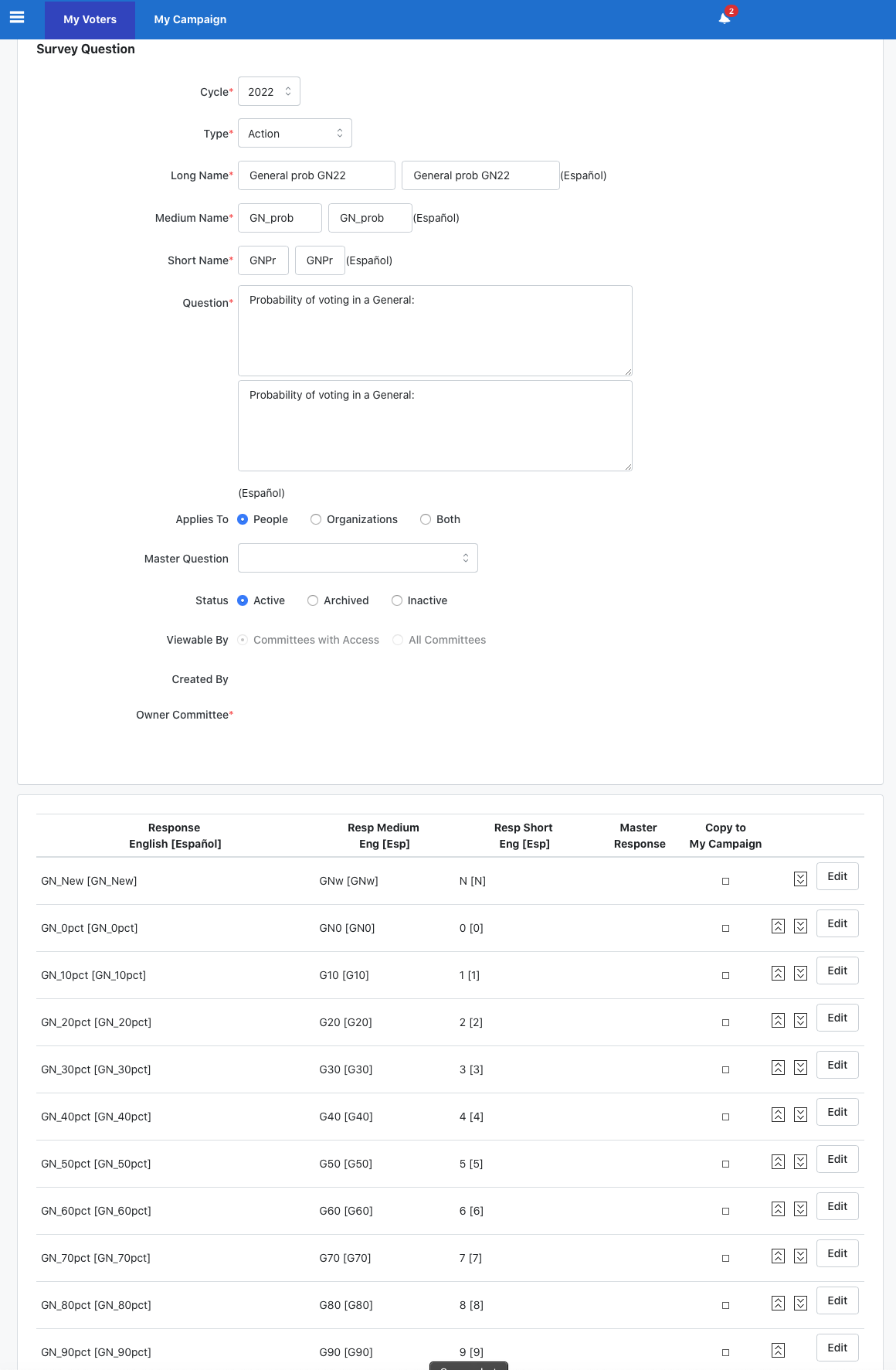
- Build a Survey Question that looks like this, adjusted for election cycle:
- Navigate to: Run Bulk Uploads | Upload a New file
- Load data with: State File ID
- (Sometimes, VoteBuilder will export unmatched voters it can’t find in its database. You can save those to examine later. It could be caused by change in Voter ID, death, or relocation.)
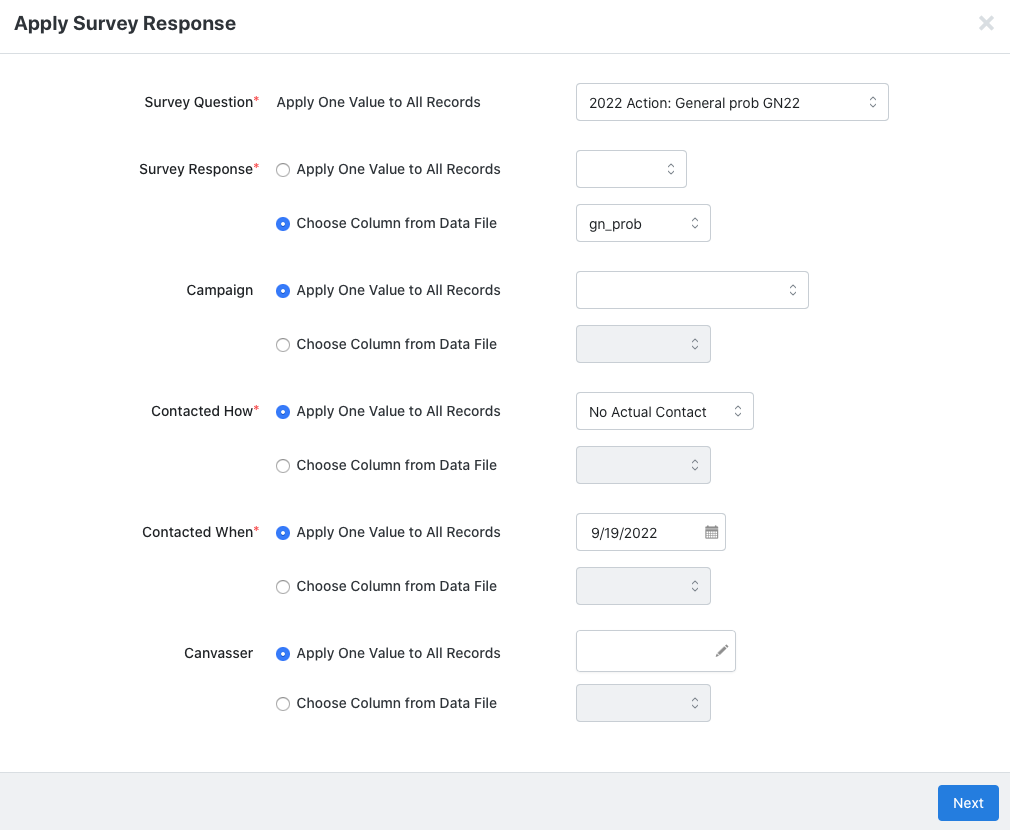
- Choose: Apply New Mapping
- Select the appropriate VoterProb® column:
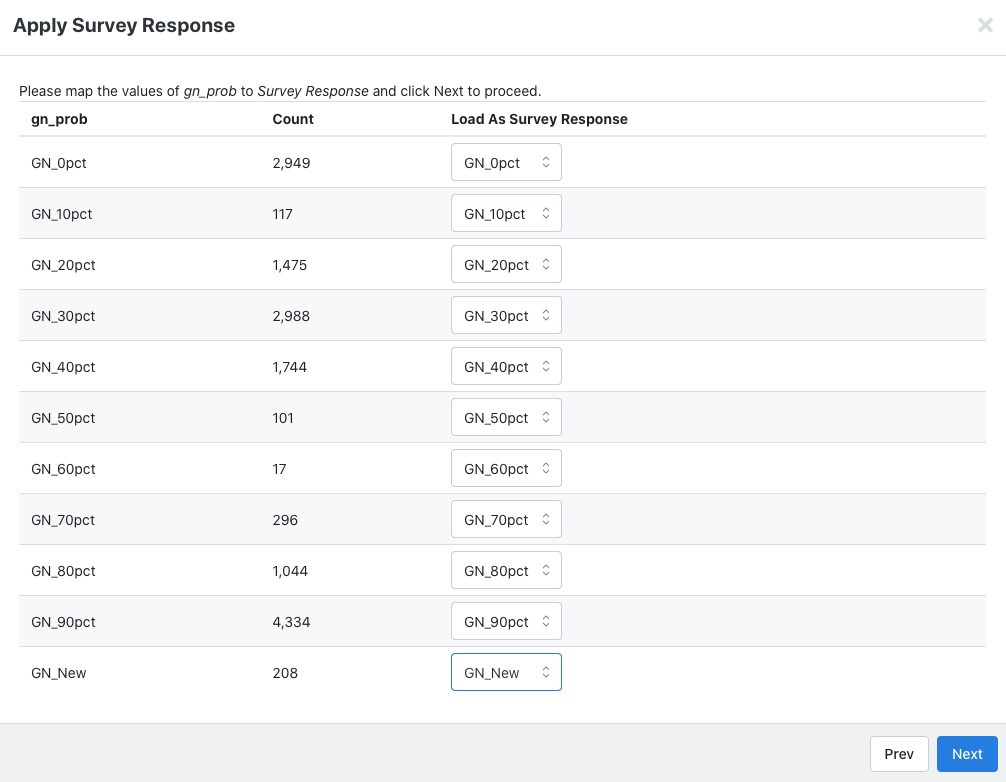
- Apply the mapping:
You can now cut lists and turfs in VoteBuilder using VoterProb® scores.
Import into NationBuilder
One of the trickiest things to do in NationBuilder is to upload likely voters into your Nation. We can help.
Your VoterProb® CSV import file is completely customizable. You will have the following columns – and more, if you need them:
- Voter ID
- Name, address, birthday, registration date, and other fields maintained in the official voter file.
- Registration state (required by NationBuilder when indexing by State Voter ID)
- VoterProb® score (exact score as a decimal number). Note: New voters with no voting record are recorded as New.
- VoterProb® score range (for use as a NationBuilder tag):
- GN_New (or PR_New if scored for a Primary): New voter (no voting record)
- GN_0: 0% =< 10%
- GN_10: 10% =< 20%
- GN_20: 20% =< 30%
- GN_30: 30% =< 40%
- GN_40: 40% =< 50%
- GN_50: 50% =< 60%
- GN_60: 60% =< 70%
- GN_70: 70% =< 80%
- GN_80: 80% =< 90%
- GN_90: 90% =<= 100%
- A human readable “Why” indicator showing in a nutshell the reason the voter received the score assigned byVoterProb®. The following fields are included:
- Immediately past General or Primary:
- V = voted; M = missed; – = not registered to vote
- Prior General or Primary:
- V = voted; M = missed; – = not registered to vote
- Report on the frequency of voting for the last ten (max) elections (ratio of the elections the voter could vote in to the number actually voted in):
- < 20%: Rarely
- < 40%: Below
- < 60%: Average
- < 80%: Above
- <= 100%: Super
- Here are some examples:
- M21; V20; Above:
- Missed voting in 2021 General/Primary;
- Voted in 2020 General/Primary;
- Above: Votes in 60% to 80% of elections
- V21; -20; Super:
- Voted in 2021;
- Was not eligible to vote in 2020;
- Super: Votes in 90% to 100% of elections
- M21; V20; Above:
- Immediately past General or Primary:
- Any specific election(s):
- M: Mail ballot
- A: Absentee ballot
- P: At polls
- /: Not registered
- <blank>: No vote
- Additional tags such as Ward, Municipality, State House, State Senate, US Congress, etc. can be included.
Create custom fields to hold any specific elections or other info for which NationBuilder does not provide columns. Please note that any tags in the tag list field are auto-generated by NationBuilder if they haven’t been created prior to the import.
Navigate to People | Import and map the columns. Here is an example of an import using VoterProb®:








Import into your own campaign management system or database
Your VoterProb® CSV import file is completely customizable. You will have the following columns – and more, if you need them:
- Voter ID
- Name, address, birthday, registration date, and other fields maintained in the official voter file.
- VoterProb™ score (exact score as a decimal number). Note: New voters with no voting record are recorded as New.
- VoterProb™ score range:
- GN_New (or PR_New if scored for a Primary): New voter (no voting record)
- GN_0: 0% =< 10%
- GN_10: 10% =< 20%
- GN_20: 20% =< 30%
- GN_30: 30% =< 40%
- GN_40: 40% =< 50%
- GN_50: 50% =< 60%
- GN_60: 60% =< 70%
- GN_70: 70% =< 80%
- GN_80: 80% =< 90%
- GN_90: 90% =<= 100%
- A human readable “Why” indicator showing in a nutshell the reason the voter received the score assigned byVoterProb®. The following fields are included:
- Immediately past General or Primary:
- V = voted; M = missed; – = not registered to vote
- Prior General or Primary:
- V = voted; M = missed; – = not registered to vote
- Report on the frequency of voting for the last ten (max) elections (ratio of the elections the voter could vote in to the number actually voted in):
- < 20%: Rarely
- < 40%: Below
- < 60%: Average
- < 80%: Above
- <= 100%: Super
- Here are some examples:
- M21; V20; Above:
- Missed voting in 2021 General/Primary;
- Voted in 2020 General/Primary;
- Above: Votes in 60% to 80% of elections
- V21; -20; Super:
- Voted in 2021;
- Was not eligible to vote in 2020;
- Super: Votes in 90% to 100% of elections
- M21; V20; Above:
- Immediately past General or Primary:
- Any specific election(s):
- M: Mail ballot
- A: Absentee ballot
- P: At polls
- /: Not registered
- <blank>: No vote
Need help? We can provide assistance in importing data and getting your team up to speed. Our goal is to enable you to work with your VoterProb® scores however you want, without requiring our assistance.